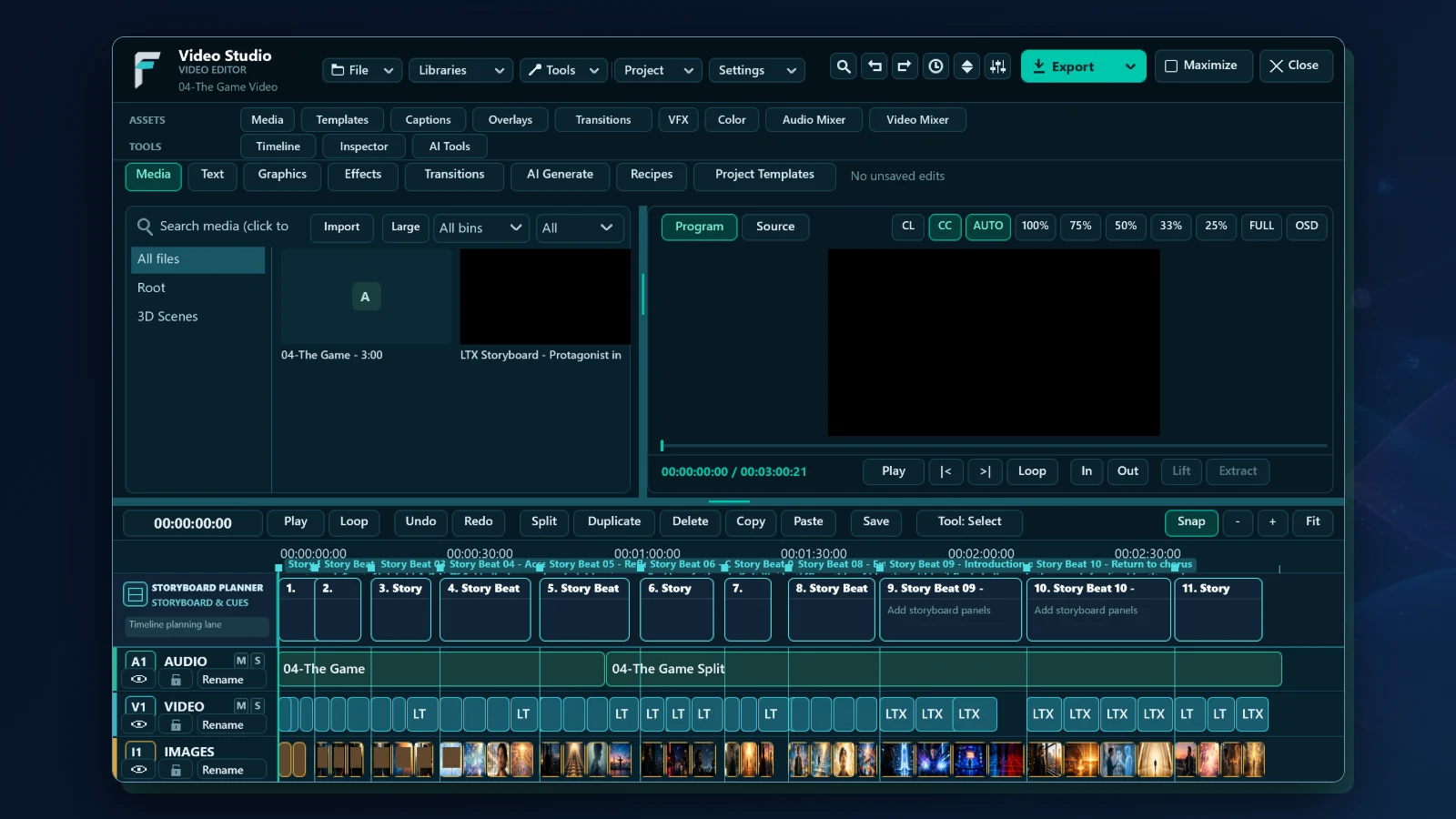
A video editor built for editors.
VIDEO EDITOR · WINDOWS · IN DEVELOPMENTFusion Video Studio is Fusion's video editor, for people who work in video. Cut on a multitrack timeline with source and program monitors, three-point edits and the five trim tools, keep timecode in view everywhere, grade, title and caption, and deliver to a master or to the web. Timelines travel to and from other editors, so a project never gets stuck in one program.
Video Studio cuts. Audio Studio mixes. Interact does it all.
Most video editors are not into audio, and most audio people don't cut picture. Fusion Video Studio and Fusion Audio Studio are focused products for each, and Fusion Interact is for people who want everything in one: 3D, editing, audio and scripting. Video Studio is built from Interact's editor, so a Video Studio project imports into Interact when the work grows.
Fusion Video Studio edits picture
The timeline, monitors, trimming, colour, titles, captions and delivery an editor works in every day.
Fusion Audio Studio makes music
An audio workstation: recording, MIDI, a mixer and plug-ins.Fusion Audio Studio →
Fusion Interact does it all
Editing, 3D, audio and Solerra scripting for interactive, live and published experiences.fusioninteract.cloud →
Cut, trim and keep your place.
Fusion Video Studio is laid out for editors: a source monitor and a program monitor, in and out marks, insert and overwrite from the keyboard, and SMPTE timecode on the clock, the ruler, the monitors and every message. Edits keep picture and sound in sync across unlocked tracks, and each is one undo step.
A multitrack timeline
IN DEVELOPMENTVideo, audio, title and caption tracks with locking, targets, snapping, markers, waveforms and clip groups. Split, ripple delete, close gaps and add edits across every unlocked track.
The five trim tools
IN DEVELOPMENTSelection, ripple, roll, slip and slide, on the keys A, B, R, Y and U, with a readout of how far the edit moved and where it lands.
Three-point editing
IN DEVELOPMENTMark in and out in the source monitor, then insert, overwrite, lift, extract or match frame, or drag the marked source onto a track.
Timecode everywhere
IN DEVELOPMENTNon-drop and drop frame at 29.97 and 59.94, a timeline start of your choice, files' own source timecode and reel names, and Go to by typed timecode.
Multicam and sync
IN DEVELOPMENTSee the angles and click to cut at the playhead. Clips can be lined up by their sound.
Media that stays found
IN DEVELOPMENTOffline files are marked, and a folder can be scanned to relink them in one step. Projects autosave as copies beside the project.
Picture and sound.
Transitions, keyframes and effects, colour and scopes, titles and graphics moved and sized on the picture itself, and the sound tools a picture editor needs before the mix goes to an audio workstation.
Transitions, effects and keyframes
IN DEVELOPMENTTransitions trimmed on the timeline, keyframes and motion paths, masks, speed ramps and curves, adjustment layers and nested sequences.
Colour and scopes
IN DEVELOPMENTColour grading, scopes on the program's picture, and a side-by-side view of two pictures.
Sound for picture
IN DEVELOPMENTVolume, pan, fades and automation, ducking, noise reduction and meters, and loudness measured to ITU-R BS.1770.
Deliver a master, a web file or stems.
The Export window has presets at the project's own frame rate, and a custom tab for editing and mastering formats. Exports queue, each from the project as it was when asked for.
Masters and image sequences
IN DEVELOPMENTProRes and DNxHR profiles, image sequences and still frames, with a choice of encoder.
Stems
IN DEVELOPMENTSound exported as Broadcast WAV stems for whoever finishes the mix.
Captions and chapters
IN DEVELOPMENTCaptions read and written as SRT, WebVTT, TTML and broadcast SCC, burned in or carried in the file, and chapters from markers.
Timelines to and from other editors.
Fusion Video Studio imports and exports timelines in the formats other editors use, with a report of anything a format cannot carry. Nothing is dropped silently, and imports never change the originals. These are checked against Video Studio's own files and the OpenTimelineIO project's reference adapters; they have not yet been exchanged with other editors themselves.
EDL, XML, FCPXML and OpenTimelineIO
IN DEVELOPMENTCMX 3600 EDLs, Final Cut Pro 7 XML, FCPXML and OpenTimelineIO, with source timecode, reels, speed, dissolves and markers. A timeline can open as a new project at its own rate and size.
AAF
PLANNEDExchange with Avid editors through AAF.
AI that you choose to use.
Fusion Video Studio has an assistant that reads the project and proposes changes, each applied as one undo step only when you accept it. It works with the AI service you pick: your own provider, or Fusion AI with your Fusion account. Generation runs on your own machines, or through Fusion AI, paid for in Fusion Cloud credits.
An assistant
IN DEVELOPMENTWorks today with your own provider. Fusion AI is a choice in the build, waiting for the service to go live.
Pictures and storyboards
WAITING ON FUSION AIGenerate a picture from a description, or a storyboard for the timeline, with the price shown before anything is sent. Built in the editor; Fusion AI's service is not yet live.
Image to video on your own nodes
IN DEVELOPMENTTurn pictures into video clips on render nodes you run yourself, with no credits spent.
Built in steps.
Fusion Video Studio is written in C++. It runs today as a development build on Windows; it has not been released, and no edition, price or date is set.
Editing, exchange and delivery
IN DEVELOPMENTEverything marked in development on this page, in the Windows development build, with its own .fvideo project files.
3D overlays
PLANNED3D titles and overlays placed and timed on the timeline, drawn by Fusion 3D Engine, from templates that ship with Video Studio.
Plug-ins
PLANNEDVideo effect plug-ins through OpenFX, the industry's plug-in standard, shared with Fusion Interact.
Fusion OS and Android
PLANNEDVersions for Fusion OS, and for Android phones and tablets.
Part of the Fusion platform.
Fusion 3D Engine
Fusion's core 3D engine, which is to draw Video Studio's 3D overlays.fusion3d.cloud →
Fusion Video Studio is in development.
What is marked in development works in the Windows development build; what is marked planned is not built. The screen on this page is that build's own window. Follow its progress, and the rest of the Fusion portfolio, on fusionsoftware.cloud.Visit fusionsoftware.cloud